LEARN → EARN → UNLOCK

Study first.
Scroll later.

PrepScroll locks the apps you can't put down until you answer a few SAT & ACT questions. A little focus. More freedom.

TRY ONE

This is what stands between you and TikTok.

Every unlock is a quick round of real SAT & ACT practice. Get it right and the minutes are yours. Get it wrong and you learn why.

SAT · MathMedium

A phone plan costs $20 a month plus $0.05 per text. Jae's bill was $27.50. How many texts did he send?

HOW IT WORKS

Willpower fades.
A locked app doesn't.

PrepScroll runs quietly in the background using Apple's Screen Time. Setup takes a couple of minutes, and then every break you take starts with a little practice.

  1. 1

    Your apps lock

    Pick the apps that eat your evenings. When your earned time runs out, they lock.

  2. 2

    You answer three questions

    A short round of real-format SAT & ACT practice, with an explanation for every answer.

  3. 3

    Your feed comes back

    Correct answers turn into minutes. Scroll guilt-free, then earn the next break.
EXPLANATIONS

Don't just get it right. Know why.

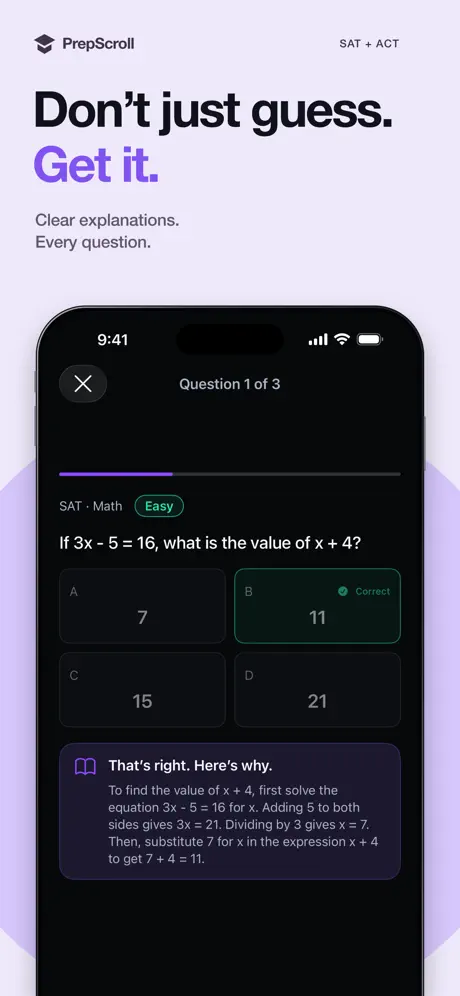
Every question comes with a clear walkthrough of the reasoning, so a wrong answer today becomes a right answer on test day.

  • Why the answer is right step by step
  • Why the others are wrong so traps stop working
  • Review what you missed after every session
A math question in PrepScroll with a step-by-step explanation
PROGRESS

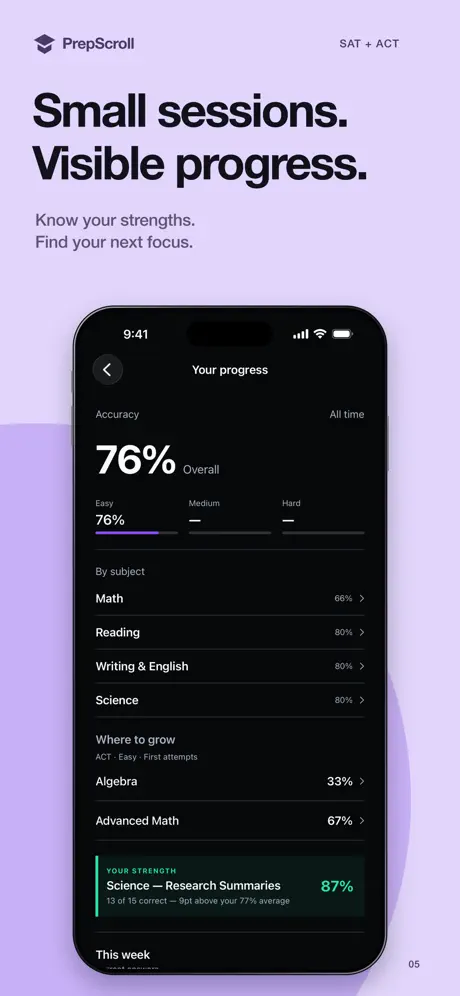
Know exactly what to study next.

PrepScroll tracks every answer, so you can see where you're strong and where the points are hiding.

  • Accuracy by difficulty Easy, Medium, Hard
  • Breakdown by subject and every skill inside it
  • Your next focus picked from your weakest area
  • Daily streaks that reward showing up
The PrepScroll progress screen showing accuracy by subject
SUBJECTS

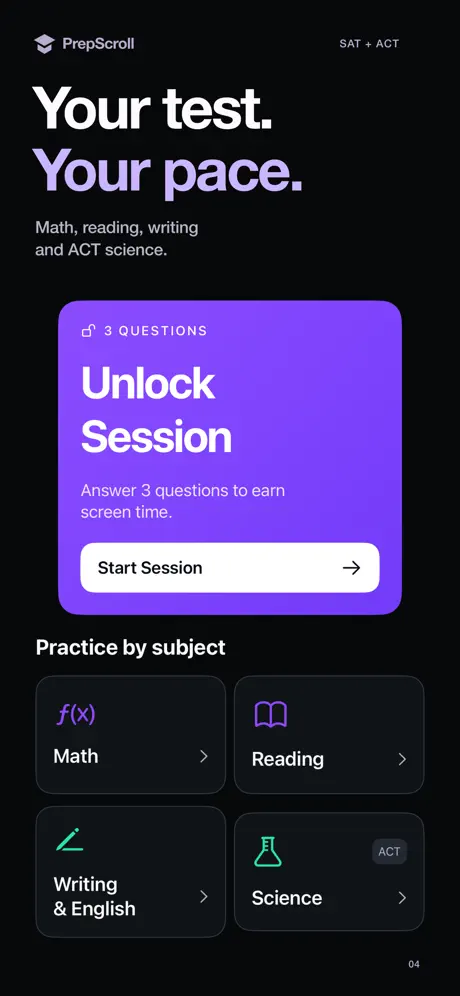
The whole test. Plus ACT Science.

Questions cover every tested domain, so the time you'd spend scrolling goes straight into your score.

  • Math Algebra, geometry, data, advanced math
  • Reading Inference and evidence
  • Writing & English Grammar and rhetoric
  • ScienceACT Data and research summaries
Practice by subject: Math, Reading, Writing and Science
PRIVACY, FOR STUDENTS AND PARENTS

We lock apps. We never look inside them.

Blocking runs on your phone through Apple's Screen Time frameworks. Here's exactly what PrepScroll can and can't see.

What PrepScroll sees

  • Your answers, accuracy and streaks
  • How much screen time you've earned
  • Which apps you chose to lock

What it never sees

  • Messages, DMs or emails
  • What you post or watch in blocked apps
  • Browsing history, location or contacts
  • Advertising IDs — there's no ad tracking
Works with Apple Family Sharing, so parents keep oversight. Your data is never sold. Read the full privacy policy
FROM THE APP STORE
“I unknowingly did over 150 questions in less than 2 days on my free time without noticing.”
Truly amazing · Saha M.
“It has helped me decrease my screen time and increase my SAT proficiency.”
Pretty solid · ZP'26
PRICING

Free to download.

Subscribe for full access. Billed through the App Store — cancel anytime in Settings.

Less than one hour with a tutor, for a whole year of practice.

Yearly Save 52%
Works out to $3.33 a month
$39.99 / yr
Monthly
For the final stretch before test day
$6.99 / mo
Get PrepScroll

Questions

Something else? Visit support or email prepscrollapp@gmail.com.

Can I still get calls and texts?

Yes. You choose which apps to lock. Keep Phone and Messages on the Always Allowed list in iOS Settings so they're never blocked.

Which apps can I lock?

Any app you choose — most people start with Instagram, TikTok, YouTube and Snapchat.

Is this official College Board material?

No. Questions are modeled on real exam formats, but PrepScroll isn't affiliated with, endorsed by, or sponsored by the College Board or ACT, Inc.

Can parents set it up?

Yes. PrepScroll works with Apple Family Sharing, so a parent or guardian keeps oversight through Apple's parental controls.

How do I cancel?

Anytime, in Settings → Apple ID → Subscriptions. You keep access until the end of the current billing period. Deleting the app doesn't cancel the subscription.

What do I need?

An iPhone or iPad running iOS 18 or later.

Your test.
Your pace.

Turn the time you already spend on your phone into points on test day.

Download on theApp Store